Wake and power on
Free yourself from morning hassles: your Mac wakes or starts up on its own, so your day gets going right away.
Power manager for macOS
iBeeZz schedules when your Mac wakes, starts up, sleeps, shuts down and restarts, day by day. It can also keep the display on when you need it. Set it once and let it take care of the rest.
iBeeZz 3 Lite · macOS Ventura and later
Features
iBeeZz is the ideal tool for eco-friendly management of your Mac, based on the days of the week.
Free yourself from morning hassles: your Mac wakes or starts up on its own, so your day gets going right away.
Schedule sleep and shutdown to save energy and keep your Mac secure while you are away.
Regular, scheduled restarts keep your system fresh and responsive.
New in iBeeZz 3.1
Keep the display on during a presentation, a digital display or a long task, then let it go back to sleep at the time you choose.
How it works
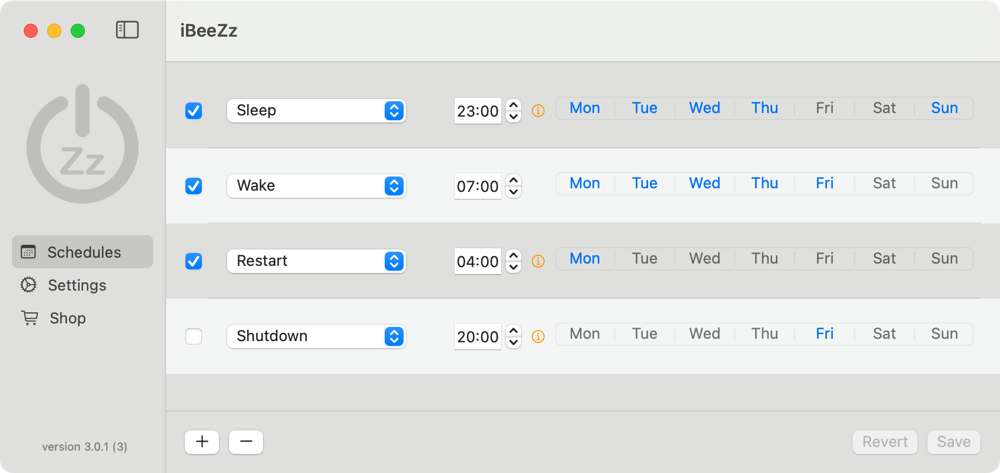
Each event fits on a single line. Add as many as you need.
Wake, power on, sleep, shut down, restart, or prevent or allow display sleep.
Down to the minute, for each event.
Monday to Sunday, only the days that suit you.
Less energy, more peace of mind. With iBeeZz, you simplify your Mac experience, save energy and boost your productivity. Your Mac works when you work, and rests the rest of the time.
Languages
The app and this site are available in seven languages.
Contact
Write to us: we read every message and get back to you quickly.